Shopify Integration for Custom Merch: A Practical Setup
You've got the merch mockups done, the store looks clean, and the drop date is on the calendar. Then someone asks a simple question, who's receiving the order, when does production start, and what happens if the fulfillment partner misses a webhook or two. That's where most Shopify integration work stops being “setup” and starts becoming the backbone of the whole merch program.
For distributed teams, conference kits, creator drops, and B2B merch orders, the danger isn't usually the storefront. It's the gap between Shopify, inventory, production, shipping, refunds, and support, the part that has to stay accurate when traffic spikes and people expect everything to just work. Shopify's merchant ecosystem reached $378.4 billion in GMV in 2025 and generated $14.6 billion during Black Friday-Cyber Monday 2025, a 27% year-over-year increase according to WebTonic's Shopify statistics roundup, which is exactly why the integration layer can't be treated like a side quest.
One ugly sync issue can turn a polished drop into duplicate production, out-of-stock oversells, and support tickets that sound the same: “Where's my order?” If you're trying to protect the customer experience as much as the merch itself, a practical Shopify dispute prevention tool is worth keeping in the stack, because checkout issues and post-purchase confusion tend to show up together. The more distributed the order flow gets, the more you need the store, the partner, and the customer to all see the same facts.
Table of Contents
- Build one naming system before anything syncs
- Prevent duplicate products before they create duplicate orders
- Brand safety starts with operational control
- The stack should support the way modern teams actually ship
Why Your Shopify Integration Matters
A founder gets the sample shirts approved, the courier timeline lined up, and the Shopify products published. The drop goes live, orders start coming in, and then the questions hit fast. Which system owns the SKU, which address gets the split shipment, and why did the partner receive two copies of the same order?
The real problem is not the app, it's the handoff
Shopify's own enterprise guidance defines data integration as unifying information from multiple sources into a single connected view, and it points to unified commerce as a way to improve inventory turnover and customer lifetime value compared with disconnected systems Shopify's business data integration guide. That framing fits merch operations well. Your store is not just a checkout page, it is the source of truth for products, orders, customers, fulfillment status, and support context.
The failure pattern is predictable. Teams install an app, map a few SKUs, and assume the rest will behave. Then reality shows up, with multi-address shipping, partial refunds, shipping label updates, and production approvals all moving through different tools. If the handoff is loose, every one of those steps becomes a manual reconciliation problem.
Practical rule: if a human has to reconcile the same order in Slack, email, and a spreadsheet, the integration is already too fragile.
What has to be true before launch
Treat readiness like a one-page checklist, not a project plan. The Shopify store needs products, variants, locations, tax settings, payment status rules, and shipping zones defined. The fulfillment partner needs an approved catalog, decoration methods chosen, packaging decided, and production and delivery timelines locked.
Internally, you also need to answer a few blunt questions.
- Who owns the SKU? Shopify, the fulfillment partner, or both.
- Where is inventory of record? The store, the OMS, or the partner system.
- How do multi-address orders route? Single fulfillment point, split shipment, or manual review.
- When does production start? On order creation, payment capture, or approval.
- What happens on a refund or reroute? Cancel, requeue, or send to review.
That is the point where the integration stops being abstract. Shopify's merchant ecosystem now operates at a scale where fulfillment sync is operationally critical, not optional as the 2025 GMV and BFCM data show. If you want a merch launch that feels clean to the buyer, the back end has to behave like a single system, even when five tools are involved. A Shopify dispute prevention tool can also reduce the amount of downstream cleanup when order issues turn into chargebacks, especially in merch programs with custom items or split fulfillment. If your catalog is already drifting toward low-volume custom work, review Banger's custom apparel no minimum setup before you lock the operating model.
Picking the Right Integration Path for Your Store
Most brands end up choosing between speed and control. A native app from the Shopify App Store gets you moving fast, usually with less engineering overhead. A custom build gives you more room for weird merch logic, but it also asks for real maintenance discipline.
Use the app when the catalog is straightforward
If you're selling a narrow set of products, one production path, and simple shipping rules, a native app is often enough. It's usually the better first move when the team wants something that works quickly and doesn't need a long implementation cycle.
A good planning companion here is the SelfServe 3PL planning checklist, because it forces the same basic questions early, where the hidden costs are easier to spot. One important constraint, if the catalog is already moving toward custom apparel complexity, review Banger's custom apparel no minimum setup before you commit to a path, because low-volume merch changes the economics of the decision.
Build custom when the rules get messy
Custom API work makes sense when the store has made-to-order SKUs, branded packaging rules, split fulfillment, or approval gates that the app can't express cleanly. Shopify's API strategy guide is blunt about the model, use APIs to read and write data, and webhooks to detect when something changes as Shopify states. That split matters because the more business logic you need, the less you want to be locked into a narrow connector.
| Dimension | Native app | Custom API build |
|---|---|---|
| Setup time | Faster to launch | Slower, needs implementation |
| Flexibility | Good for common workflows | Better for merch-specific rules |
| Maintenance burden | Lower at first | Higher, but more controlled |
| Total cost at scale | Can rise as complexity piles up | Usually better when complexity is real |
| Multi-address shipping | Often limited | Can be designed in |
| Brand packaging rules | Basic to moderate | Fully configurable |
When the store starts needing approval states, production exceptions, or split routing, “just install the app” stops being a serious strategy.
The core decision is less about tooling and more about the shape of the merch program. If the logic is simple, don't overbuild. If the logic is brand-sensitive and operationally awkward, the custom route pays for itself in fewer manual fixes.
Mapping SKUs and Products the Right Way
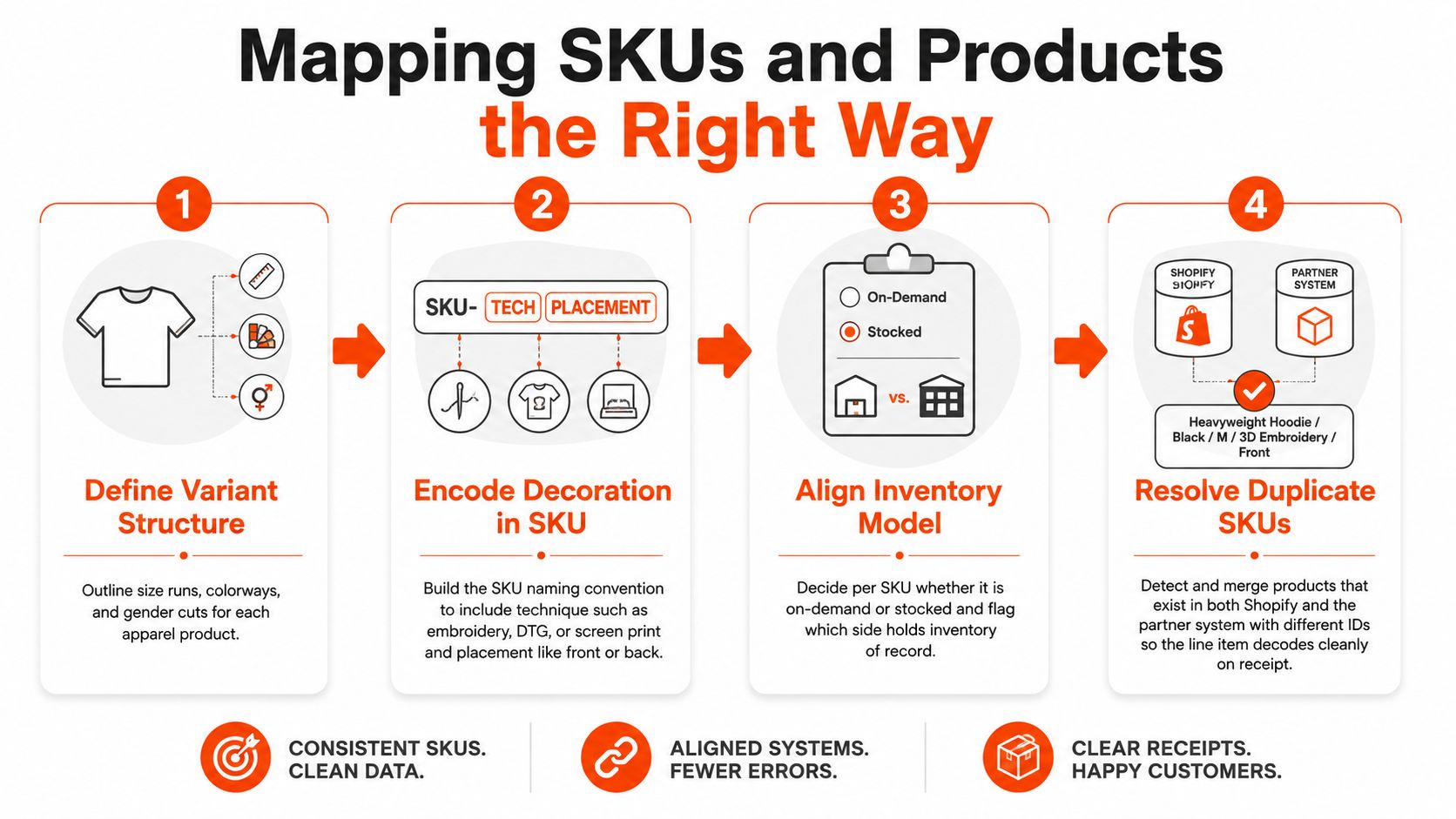
SKU mapping is where a lot of Shopify integration work breaks. The product page looks fine, the catalog sync succeeds, and then production receives a line item that cannot be decoded without guessing. That is how you end up with the right hoodie in the wrong color, or the right design on the wrong decoration method.
Build one naming system before anything syncs
Shopify's own API docs make the split clear, Admin API handles operational reads and writes for orders, products, inventory, and customers, while webhooks handle change detection. That matters here because SKU mapping belongs in a durable system of record, not in someone's memory or in a spreadsheet that drifts out of date.
For apparel, the SKU has to carry the details production needs. Size runs, colorways, gender cuts, decoration method, and placement all matter. A line item like Heavyweight Hoodie / Black / M / 3D Embroidery / Front should decode the same way in Shopify and in the partner system every time.
Prevent duplicate products before they create duplicate orders
The common failure mode is simple. The same physical product exists in both systems, but with different IDs and slightly different names. One side treats it as one item, the other side treats it as two related items, and routing starts improvising.
The cleaner move is to map fields first, then map products.
- Variant structure: decide how size, color, and cut are expressed.
- Decoration technique: encode embroidery, DTG, screen print, or another method directly.
- Placement: front, back, sleeve, or another defined location.
- Inventory model: on-demand or stocked.
- System ownership: which platform can create, update, or retire the SKU.
If you are building a merch catalog that needs to support this level of detail, keep Banger's custom apparel catalog handy as a reference point for how broad the product structure can get without falling apart.
The important part is discipline. Once the naming convention is live, casual changes create downstream noise in fulfillment, support, and reporting. If you lock the mapping early, Shopify can stay clean while the partner system handles the operational heavy lifting.
Wiring Up Order Flow and Webhooks
A Shopify order is only useful if the next step is unambiguous. The order comes in, the mapped SKU resolves cleanly, and the system either starts production right away or holds for approval. If that path is vague, customers wait, support fields questions it can't answer quickly, and fulfillment teams end up doing duplicate work.
Start with a clear event model
Shopify recommends handling fast-changing flows like orders and inventory with an event-driven pattern that uses webhooks, queues, explicit retry logic, dead-letter queues, and staged promotion from testing to production, because webhook delivery cannot be treated as guaranteed under live traffic Shopify's API strategy guide. That is the backbone of a merch integration that has to survive real launch conditions.
In practice, the core events usually include:
- orders/create for capturing the purchase.
- orders/paid for triggering production when payment is the gate.
- fulfillments/update for shipping status back to the customer.
- inventory_levels/update for stock movement or availability changes.
Practical rule: if the same order event can fire twice, design for that before launch, not after the second production run.
Queues matter because Shopify is not the only system that has to stay calm. The fulfillment partner may lag, the decorator may need a manual review, and the warehouse may receive updates out of sequence. A good event model absorbs those gaps instead of forcing every team to improvise in real time. If you are wiring a store into a broader production workflow, merch fulfillment services are where those handoffs tend to break first, so the integration should match the actual partner process rather than an idealized one.
Keep the customer-facing flow boring
The customer should never see the machinery. Shopify captures the order, the fulfillment partner receives the right line items, and the status moves through production, packed, shipped, and delivered. If approval is part of the process, make it a defined state in the system, not a Slack message someone might miss during a busy drop.
For merch teams that use approval gates, Banger's merch eProof approval flow is a useful example of how production review can become a system step instead of a human memory test. That matters because creative sign-off is where brand mistakes get caught cheaply, before they turn into reprints or customer complaints.
The practical stack stays straightforward. Use the Admin API for reading and writing order data, webhooks for detecting changes, and queues for handling the ugly moments when a partner system is slow or temporarily unavailable. If your store connects to a fulfillment workflow that also manages production details and handoffs, keep Shopify's API strategy guide close and align the integration to how the partner works, not how the diagram looks in a slide deck.
Testing and QA Before You Go Live
A Shopify integration can look clean in a demo and still fall apart under real traffic. The difference is usually in the test matrix, not the code. If the team only tests one happy-path order, they are guessing at launch.
Run the ugly orders on purpose
Use a Shopify dev store or staging store, plus a partner sandbox, and push every awkward scenario through both sides. The point is not to admire the setup. It is to see where it bends and where it breaks.
A useful test matrix includes a single SKU, a multi-line order, a variant-heavy order, an international address, a multi-address split, a refund, a partial refund, a reorder of a previously produced SKU, an out-of-stock scenario, and a webhook outage simulation. That is where the operational fragility shows up. Mature Shopify integration programs can reduce inventory discrepancies in some brand deployments, but only when profiling and cleansing are treated as a real sub-project with business ownership as FosterUI notes.
Make approval and packaging part of QA
The creative side matters just as much as the data side. If the brand needs sample approvals or photo proofs from the atelier, the BAT, Bon À Tirer, should be a formal checkpoint in the order flow. That is the moment where someone verifies the final output, not just the mockup. If your merch program uses approval gates, Banger's merch eProof approval flow is a practical example of how to turn review into a system step instead of a memory test.
Packaging belongs in QA too. Shipping profiles, duties handling, and branded packaging need to be defined before launch, because they shape the customer's first physical interaction with the product. If the box opens with inconsistent inserts, tissue, stickers, or hang tags, the merch feels cheaper than it looked online.
A useful packaging reference is Banger's custom apparel packaging guide, which helps align the brand team and the fulfillment partner before the first live order. That is also the right time to confirm how made-to-order versus stocked merch is taxed in the store setup, since the wrong assumption creates another cleanup job after launch.
A launch only feels smooth if the ugly cases already passed in staging. If they did not, the store will teach you the lesson in production, and customers will pay for it.
Failure Handling and Resilience Most Guides Skip
This is the part most Shopify integration guides skip, which is exactly why it matters. When the connector breaks, the problem isn't just technical. It hits inventory, support, shipping, and brand trust at the same time.
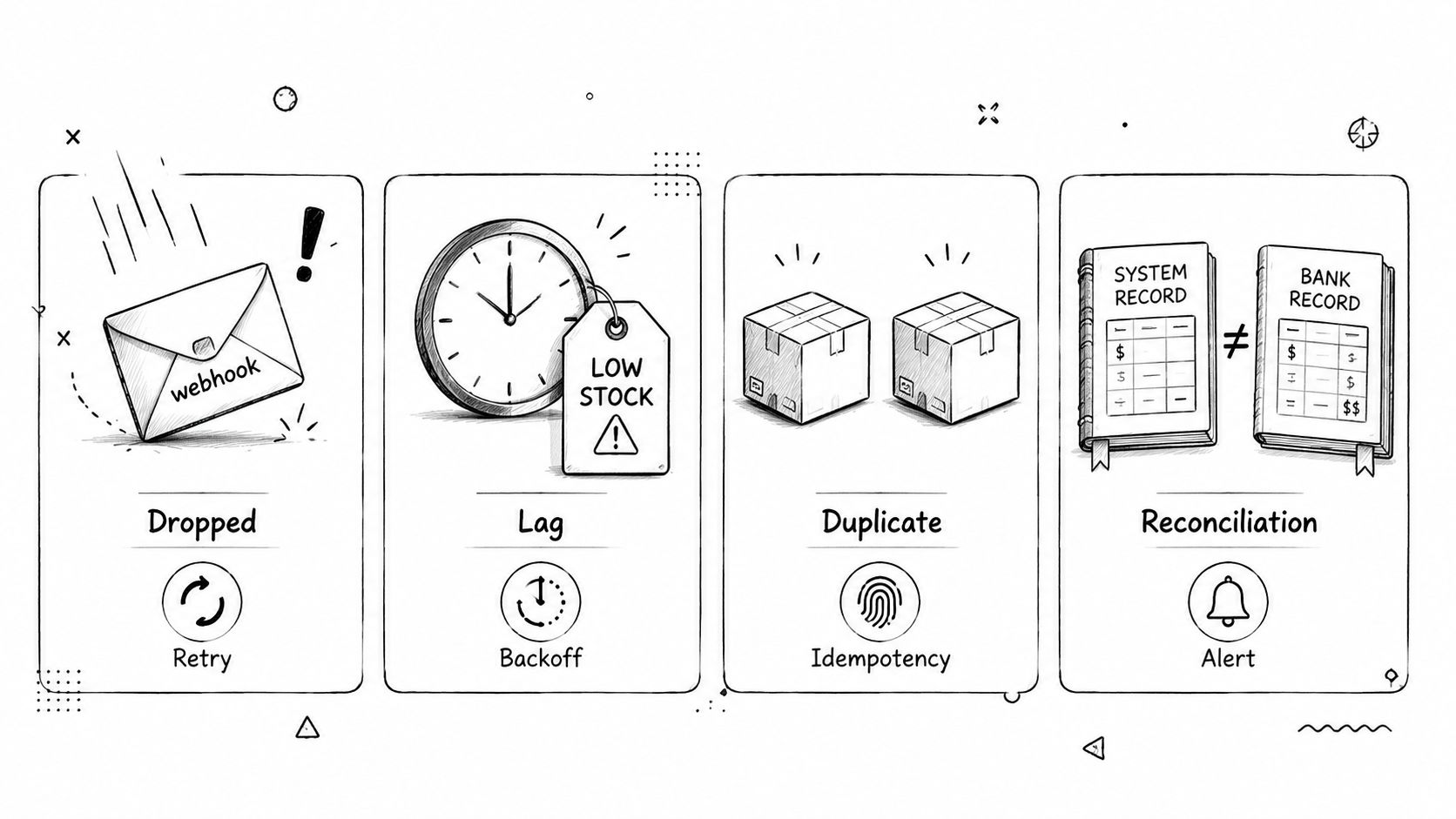
Know the four failure modes
Shopify's enterprise guidance says the recurring trouble spots are siloed systems, ERP complexity, synchronization gaps, and data-quality inconsistency, and it also points out that resilience tooling like payment failover and operational health detection is still underserved in the app ecosystem Shopify's data integration challenges guide. That lines up with what usually breaks in merch.
- Dropped webhooks: the order never reaches the partner.
- Lagging inventory sync: customers buy stock that's already gone.
- Duplicate events: the same order is produced twice.
- Reconciliation gaps: Shopify and the partner disagree on what happened.
Fix the failure mode, not the symptom
Dropped webhooks need retry queues, dead-letter queues, and alerting so the event doesn't vanish into thin air. Lagging inventory needs a real-time sync target that doesn't drift into “we'll check it later.” Duplicate events need idempotency keys on every order event, because production teams don't want to guess whether an order is new or just repeated.
If the webhook failed silently once, assume it'll happen again and build the recovery path now.
Watch the system after launch
A healthy integration has observability, not optimism. Dashboards should flag anomalies in order volume, fulfillment lag, inventory mismatches, and failed retries. The point is to catch the weird stuff before customers do.
The hardest truth is that resilience is boring until it saves the day. When a merch drop is live, boring is exactly what you want. If the system can replay events, isolate errors, and degrade safely during a partial outage, the launch survives the weird part instead of collapsing under it.
Building a Brand-Safe Merch Program on Top of It All
A Shopify integration that only moves order data is still too fragile for merch. The harder part is making the store behave like a real program, where checkout, production, packaging, and approval history all stay aligned when orders come in from different channels and on different schedules.
Brand safety starts with operational control
Low minimums, on-demand production, and reorders of approved designs depend on an integration you can trust under pressure. If the system routes each order to the right atelier, attaches the right packaging instructions, and preserves the approval trail, the merch stops acting like a one-off campaign and starts behaving like a repeatable program.
That operational control is what keeps brand decisions from getting lost in fulfillment noise. A community drop may need one packing flow, a conference giveaway another, and an internal team kit another still. The brand only holds if the integration can pass those differences through cleanly.
For teams that treat packaging as part of the brand, Banger's custom apparel packaging overview shows how inserts, tissue, mailers, and branded details can be handled without turning the workflow into manual cleanup. The point is not the packaging itself, it is the control layer behind it. The right setup lets a merch program keep the same brand feel across different shipping rules without forcing every order through a human.
The stack should support the way modern teams actually ship
Banger is one option in this space, with European-sourced premium blanks, French ateliers, Shopify integration, and worldwide fulfillment for branded apparel programs. The useful part is the operational shape, a merch partner that can handle multi-address shipping, branded packaging, and on-demand production without making every order a special case.
If the stack is set up well, a distributed team, a conference floor, or a creator community can all be served from the same store without spreadsheets or manual follow-up. The partner gets the right instructions, the store stays tidy, and the customer gets a package that feels deliberate instead of improvised.
If you want merch that survives after the first drop, keep the integration honest, keep the SKU logic strict, and keep the fulfillment experience brand-safe. Build the program around that foundation, because once orders start flowing, it is the weak handoff points that decide whether the brand feels controlled or messy.
If you're building a merch program that needs to survive real orders, not just mockups, Banger can help with premium blanks, custom apparel, branded packaging, and Shopify-connected fulfillment. Visit Banger to explore the catalog, request a quote, and see how your next drop can run without the usual integration headaches.